Subnet Information
IPv4 Split Calculator
Split a larger IPv4 network into smaller subnets. Example: split 192.168.1.0/24 into multiple /27 or /29 networks.
How to Use This IPv4 Subnet Calculator
This calculator helps network technicians, CCNA students, MikroTik users and ISP engineers quickly convert between CIDR notation and subnet masks. Enter an IPv4 address, select either a CIDR prefix or subnet mask, and the tool calculates the network address, broadcast address, first usable host, last usable host and total usable hosts.
For example, if you enter 192.168.1.10/24, the network address is 192.168.1.0, the broadcast address is 192.168.1.255, and the usable host range is 192.168.1.1 to 192.168.1.254. This is a common subnet size for small offices, home networks, guest WiFi and simple VLANs.
Common IPv4 Subnetting Mistakes
- Using the network address as a device IP address.
- Using the broadcast address as a host address.
- Choosing a subnet that is too small for future growth.
- Confusing CIDR notation such as /27 with a subnet mask such as 255.255.255.224.
- Forgetting that /30 networks are usually used for point-to-point links, not normal LANs.
Google AdSense In-Content Ad
IPv6 Calculator
IPv6 Split Calculator
Split a larger IPv6 allocation into smaller prefixes. Example: split 2001:db8::/48 into multiple /64 LAN prefixes.
Subnet Quiz
Practice subnetting and CIDR calculations for CCNA, Cisco and MikroTik certifications.
Example Network Layout
This example shows three separate IPv4 networks connected through two routers. It helps explain how subnetting separates devices into different networks and how routing allows those networks to communicate.
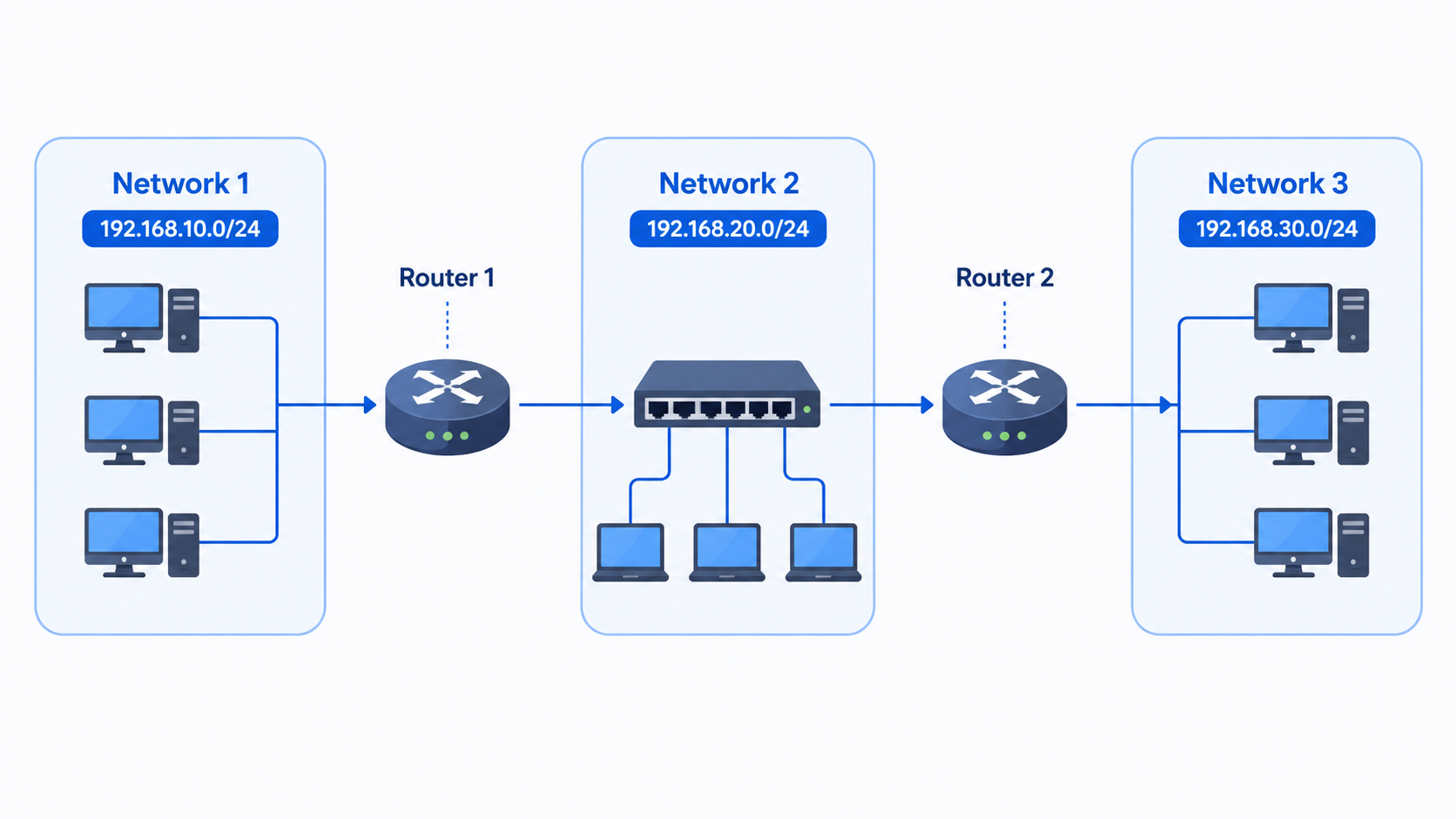
192.168.10.0/24, Network 2 uses 192.168.20.0/24, and Network 3 uses 192.168.30.0/24. Router 1 connects Network 1 to Network 2, while Router 2 connects Network 2 to Network 3. This layout is useful for learning subnet separation, default gateways, static routes and inter-network routing.
Practical Subnetting Guide
Subnetting is used to divide one larger IP network into smaller logical networks. In real deployments, this is useful for separating office users, guest WiFi, CCTV cameras, VoIP phones, servers, routers and management equipment.
A small business might use a /24 for general office users, a /27 for CCTV cameras, a /28 for network management devices and a /30 for a point-to-point router link. ISPs and wireless network operators often use smaller subnets to conserve public IPv4 space and larger private blocks for internal routing.
When to Use Common Subnet Sizes
- /24 — common LAN size with 254 usable hosts.
- /25 — useful when splitting a /24 into two smaller networks.
- /26 — good for small departments, camera networks or customer VLANs.
- /27 — useful for small device groups with up to 30 usable hosts.
- /30 — commonly used on point-to-point IPv4 router links.
How to Split a /24 Network into Smaller Subnets
A /24 network contains 256 total IPv4 addresses, normally giving 254 usable host addresses. You can split that /24 into smaller subnets when you want to separate users, VLANs, CCTV cameras, VoIP phones, servers, guest WiFi or customer networks.
Example base network: 192.168.1.0/24. The smaller the subnet, the more separate networks you get, but each network has fewer usable host addresses.
Splitting 192.168.1.0/24 into /27 Subnets
A /27 has 32 total addresses and 30 usable hosts. A /24 can be split into 8 x /27 subnets.
Splitting 192.168.1.0/24 into /29 Subnets
A /29 has 8 total addresses and 6 usable hosts. A /24 can be split into 32 x /29 subnets. This is useful for small device groups, router management blocks, small customer allocations and tight IPv4 address planning.
Pattern: /27 subnets increase by 32 in the last octet. /29 subnets increase by 8 in the last octet.
Quick Split Reference for a /24
IPv4 Subnetting Cheat Sheet PDF
Download our printable IPv4 subnetting cheat sheet.
Calculation Methodology and Validation
The IPv4 calculator converts the address into a 32-bit integer, applies the selected subnet mask, and calculates the network and broadcast addresses using standard binary operations. The first and last usable addresses are then derived from the network and broadcast boundaries.
The results are intended for planning and learning. For production networks, always confirm routing, firewall and DHCP configuration on the actual router, switch or controller before deployment.
Author and Editorial Note
This resource is maintained as a practical networking reference for learners, technicians and engineers working with IPv4, IPv6, MikroTik, Cisco and ISP-style networks. Content should be reviewed and expanded regularly as new examples and guides are added.